
A Free remove.bg Alternative for Full-Size PNGs
remove.bg closes on 1 December 2026. Drop an image here instead: remove the background, refine the edges and download a PNG at your image's full size. No credits, no sign-up.
- Free, no credits to buy
- Same-size PNG, no watermark
- Files expire after 24 hours
Drop an image hereRemove a background from your photo
or paste with Ctrl/⌘ V
JPG, PNG or WebP · up to 10 MB, 25 MP
No image handy? Try one:
Samples run through the same editor. Have a stack of photos? Bulk background remover →
Ready when you are
Your image stays on this device until you start.
Working on your image
- Uploading…0.0 MB of 2.4 MB
- Waiting for a free slot#3 in line · it'll start automatically
- Removing background…Finding the subject and its edges
- FinishingPreparing your PNG
Connection interrupted. Checking the same request again…
Your image is uploaded securely to process it. Keep this tab open until it finishes.
We couldn't remove the background
The server couldn't finish this image.
Your image is still here — nothing is lost.
Supported files
JPG, PNG or WebP, up to 10 MB, 25 MP. Animated GIF / WebP and HEIC aren't supported yet.
The background
What changes at remove.bg on 1 December 2026
remove.bg is part of Canva and is folding its standalone site into Canva. Here is what its own FAQ says.
- Website
The standalone site closes
From 9:00 CET on 1 December, remove.bg's website is no longer available. Background removal moves into Canva designs.
- Credits
Unused pay-as-you-go credits expire
Credits are not carried over. Subscriptions end automatically; annual plans get a pro-rata refund.
- API
The self-service API stops
API access moves to Leonardo.Ai, also part of Canva. Enterprise API contracts continue.
- Apps
Plugins and integrations end
The Photoshop plugin and other integrations are discontinued. Export your invoices and usage report before the date.
Source: remove.bg FAQ, checked 14 November 2026. EasyRemoveBG is not affiliated with remove.bg or Canva.
Side by side
remove.bg vs Canva vs EasyRemoveBG
What each option gives you for a quick cut-out, as of 14 November 2026.
Sources: remove.bg FAQ, remove.bg free plan, Canva Background Remover. Checked 14 November 2026; plans change, so confirm on their sites.
Real results
Drag to compare. Then try it on the same image.
Unedited AI output. Where it isn't perfect, we show it — that's what the brush is for.
AI-generated originals. Actual EasyRemoveBG results.
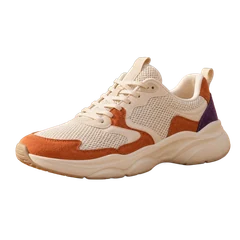
 BeforeAfter

 BeforeAfter

 BeforeAfter

 BeforeAfter
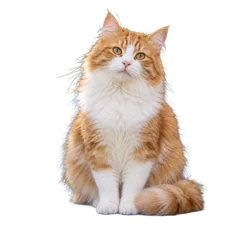
 BeforeAfter

 BeforeAfter
Switching
Moving from remove.bg takes a minute
The same upload, cut-out and download you're used to — nothing to install or import.
- 1
Drop your image
Pick, drop or paste a JPG, PNG or WebP up to 10 MB. No account for single images.
- 2
Remove and refine
Click Remove background, then use Erase and Restore on hair, gaps or thin strokes.
- 3
Download PNG
Keep it transparent or pick a solid color. For several files, use the bulk remover.
Honest fit
Is EasyRemoveBG the right replacement?
For quick cut-outs on the web, probably. For automation or design work, another option is better.
A good fit if you…
- used the remove.bg website for one image at a time
- want a full-size transparent PNG without buying credits
- cut out products, portraits, pets, logos or signatures
- need a white background for listings
- process up to 10 images in a batch with Google sign-in
Look elsewhere if you…
- call remove.bg from code — try Leonardo.Ai's API
- relied on the Photoshop plugin — Photoshop has its own Remove Background
- already design in Canva — its remover is the official successor
- need images to stay on your device — we process in the cloud
- need video, animated GIF or HEIC files
More tools
Made for the image you actually have
Same editor, set up for a specific job.
Bulk Background Remover
Add up to 10 photos at a time, retry any that fail and download the results as one ZIP.
Open tool →White Background Maker
Starts with a white backdrop selected — handy for product listings and ID-style photos.
Open tool →PNG Transparent Background
Turn any JPG or WebP into a PNG with a real transparent background.
Open tool →Logo Background Remover
Lift a raster logo off its backdrop and clean the gaps inside letters and shapes.
Open tool →Signature Background Remover
Remove paper from a photographed or scanned signature and erase stray specks.
Open tool →WebP Background Remover
Drop a still WebP image and get a transparent PNG back.
Open tool →FAQ
Questions from people leaving remove.bg
Short answers on credits, quality and privacy.
Is remove.bg shutting down?
Its standalone website closes on 1 December 2026 at 9:00 CET. Background removal moves into Canva, and the self-service API moves to Leonardo.Ai. See the remove.bg FAQ for refunds and account exports.
Can I move my remove.bg credits to EasyRemoveBG?
No. Credits can't be transferred, and you don't need any: EasyRemoveBG has no credits or paid plans. Use your remaining remove.bg credits before they expire.
Is it really free? Do I need an account?
Yes. Removing a background, refining it and downloading the PNG is free. Single images need no account; batches need a Google sign-in.
Do I get a full-resolution, HD download?
Yes. The PNG has the same pixel size as your image, up to 25 megapixels (for example 6000 × 4000 px) and 10 MB. There is no watermark.
Is there an API like remove.bg had?
No. EasyRemoveBG is a browser tool only. For automated or high-volume work, Leonardo.Ai's API carries remove.bg's API.
What happens to my images?
Your image is uploaded over an encrypted connection and processed in the cloud. The upload and result expire 24 hours after upload and are deleted during daily cleanup.
Can I remove backgrounds from many images at once?
Yes — use the Bulk Background Remover. Sign in with Google to process up to 10 images per batch and download the results as one ZIP.
Try it on one of your images
Use an image you'd normally send to remove.bg and compare the result yourself.